An iPhone remote for your Sony BRAVIA.
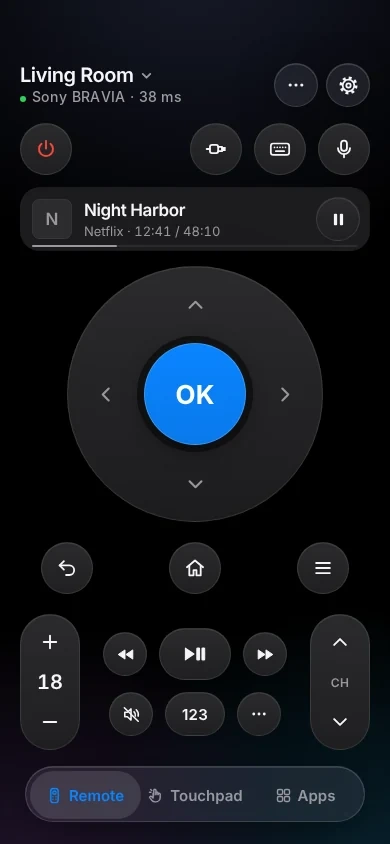
TVkip controls Sony BRAVIA TVs from 2013 to today over your Wi-Fi: every button, typing, volume, apps, HDMI inputs and power. You turn on the TV's IP control once and type a PIN or a key you choose; where that setting lives depends on the TV's year.
TVkip is an independent app. It isn't made by, affiliated with or endorsed by Sony; the Sony and BRAVIA names only describe which TVs it works with.
What works on each BRAVIA
BRAVIA TVs from 2015 on run Android TV or Google TV, so they also appear as a Google TV. The BRAVIA connection is the one that adds inputs, the full app list and turning the TV on.
| 2013–2015, without Android | 2015–2024, Android TV and Google TV | 2025 models | |
|---|---|---|---|
| Found automatically | With Renderer on | Yes | Yes |
| Pairing | PIN once | PIN or key once | Key once |
| Every button | Yes | Yes | Yes |
| Typing | While the TV's keyboard is open | Most apps | Most apps |
| Volume level | Yes | Yes | Yes |
| Apps list and launch | Yes | Yes | Yes |
| HDMI inputs | Yes | Yes | Yes |
| Turn off / on | Off; on needs Remote start | Off; on needs Remote start | Off; on needs Remote start |
| Now playing | TV channels and HDMI | TV channels and HDMI | TV channels and HDMI |
The one setting you may need
BRAVIA TVs let phones in through IP control. Turn it on once:
- 2025 models (Settings has a BRAVIA Settings menu): Settings > BRAVIA Settings > IP control. Turn on Control remotely, set Authentication to Pre-Shared Key and choose a key. Models sold in Europe need 16 to 20 characters.
- 2015–2024: Settings > Network & Internet > Remote device settings > Control remotely → On (2015–2019: Settings > Network > Remote device settings). Then Home network > IP control > Authentication → Normal and Pre-Shared Key.
- 2013–2015 without Android: Settings > Network > Home Network Setup > IP Control > Authentication → Normal and Pre-Shared Key, and Remote Device / Renderer → On.
To turn the TV on from your iPhone
Turn on Remote start: Settings > BRAVIA Settings > Remote start (2025), Settings > Network & Internet > Remote start (2020–2024), Settings > Network > Remote start (older). Without it the TV switches its network off in standby.
Set it up
- Turn on IP control (above) and put your iPhone on the same Wi-Fi as the TV.
- Open TVkip and allow Local Network access when iOS asks. Your BRAVIA appears in the list.
- Pick it. Most 2015–2024 models show a 4-digit PIN; type it within a minute. 2025 models, and TVs set to Pre-Shared Key only, ask for the key you chose instead.
- That's it. TVkip connects by itself from now on.
The full guide is Connecting a Sony BRAVIA TV.
Honest limits
- IP control has to be on first. BRAVIA TVs ship with it off.
- 2025 European models accept only a key of 16 to 20 characters, and show no PIN. If Pre-Shared Key stays greyed out, restart the TV and try again.
- Typing on 2013–2015 models works only while the TV's own keyboard is on screen.
- Now playing shows TV channels and HDMI sources, not what's playing inside apps.
- BRAVIA TVs from before 2013 and Sony projectors can't be controlled: they don't have the interface TVkip uses.
What's free, and what Pro adds
Free, for up to two TVs: the whole remote (buttons, touchpad, keyboard, app launcher, inputs), Easy Mode, your iPhone's volume buttons, Control Center and Action button controls, the Lock Screen volume widget, the Live Activity, the Apple Watch remote for the TV you're using, basic Siri and 10 casts a day.
Pro adds a third TV and more, screen mirroring, unlimited casting with music and web videos, the full Watch app, more widgets, scenes with HomeKit lights and Kids Mode. Pro Yearly is US$14.99 a year with a 14-day free trial; Pro Lifetime is US$29.99 once.
Questions
My BRAVIA shows up twice. Which one do I pick?
Pick the BRAVIA one. Google TV and Android TV models also appear as a Google TV, which needs no settings but has no inputs or power on.
The TV asks for a pre-shared key. What is it?
A password you choose yourself, under IP control > Pre-Shared Key on the TV. Type the same key in the app; it's case-sensitive.
Can it replace Video & TV SideView?
For the remote, yes. Sony has said its Video & TV SideView app closes on March 30, 2027. TVkip doesn't show a programme guide or schedule recordings.
Will it turn my BRAVIA on?
Yes, once Remote start is on. TVkip also wakes the TV over the network when the TV allows it.