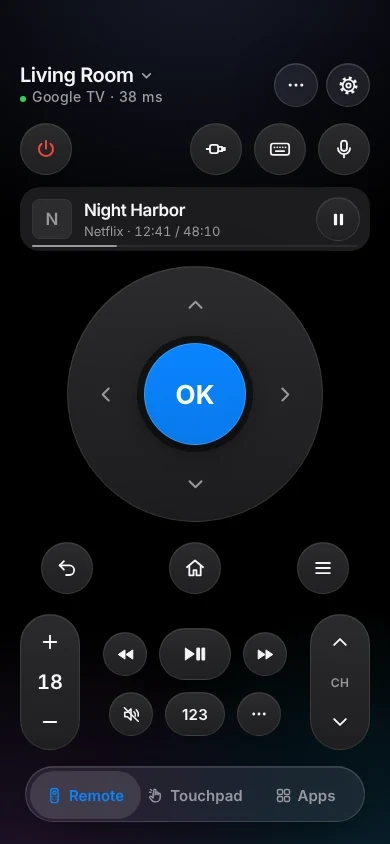
An iPhone remote for Google TV and Android TV.
TVkip controls Google TV and Android TV sets and boxes over your Wi-Fi: Chromecast with Google TV, Google TV Streamer, NVIDIA SHIELD, and TVs from Sony, TCL, Hisense, Philips, Xiaomi and others. You type a code from the TV once; after that it connects by itself.
TVkip is an independent app. It isn't made by, affiliated with or endorsed by Google or the TV makers named here; their names only describe which devices it works with.
What works, by kind of device
Every Google TV and Android TV device uses Google's remote protocol, through a system app called Android TV Remote Service. What differs is whether the device is a TV or a box plugged into one.
| Chromecast with Google TV, Google TV Streamer | Boxes: SHIELD, onn, Mi Box | TVs: Sony, TCL, Hisense, Philips | |
|---|---|---|---|
| Found automatically | Yes | Yes | Yes |
| Pairing | Code once | Code once | Code once |
| Every button | Yes | Yes | Yes |
| Typing | Most apps | Most apps | Most apps |
| Volume | Up, down, mute; no level | Up, down, mute; no level | Yes |
| Apps | Popular apps | Popular apps | Popular apps |
| HDMI inputs | No | No | No |
| Turn off / on | Yes | Off; on varies by box | Off; on needs a setting |
| Now playing | App name | App name | App name |
The one setting you may need
If the TV isn't listed or shows no code
Update Android TV Remote Service: on the TV, open Settings > Apps > See all apps > Show system apps > Android TV Remote Service and update it from the Play Store. Version 4 and older can't be controlled from phones. Still no code? In the same place choose Force stop, then Clear storage, and restart the TV.
To turn the TV on from your iPhone
- Chromecast with Google TV, Google TV Streamer: always ready, nothing to change.
- NVIDIA SHIELD: turn off Settings > Remotes & accessories > Simplified wake buttons.
- Sony: Settings > Network & Internet > Remote start → On.
- TCL: Settings > System > Power and energy > Screenless service → On.
- Some Xiaomi and onn devices switch their network off in standby; turn those on with their own remote.
Set it up
- Put your iPhone on the same Wi-Fi as the TV or box.
- Open TVkip and allow Local Network access when iOS asks. Your device appears in the list.
- Pick it. A 6-character code appears on the TV. It uses only numbers and the letters A–F, so an O is a 0.
- Type it in the app. That's it; it connects by itself from now on, even when the TV gets a new IP address.
The full guide is Connecting a Google TV or Android TV.
Honest limits
- No input switching. Google's remote protocol has no list of HDMI inputs.
- Boxes don't report the volume. Chromecast, Google TV Streamer and SHIELD pass volume to your TV over HDMI, so up, down and mute work, but there's no level to set.
- Opening apps: since Google's 2026 change, Netflix, YouTube, Prime Video, Disney+, Plex and Twitch open directly. Others may open the Play Store instead; start those from the TV's home screen.
- “Use the keyboard on your mobile device” appears on the TV while TVkip is connected. Type in the app, or pick Gboard as the TV's keyboard.
- Sony BRAVIA TVs also appear as BRAVIA; that connection adds inputs and the full app list (Sony BRAVIA).
What's free, and what Pro adds
Free, for up to two TVs or boxes: the whole remote (buttons, touchpad, keyboard, app launcher), Easy Mode, your iPhone's volume buttons, Control Center and Action button controls, the Lock Screen volume widget, the Live Activity, the Apple Watch remote for the device you're using, basic Siri and 10 casts a day over Google Cast.
Pro adds a third device and more, screen mirroring, unlimited casting with music and web videos, the full Watch app, more widgets, scenes and Kids Mode. Pro Yearly is US$14.99 a year with a 14-day free trial; Pro Lifetime is US$29.99 once.
Questions
Does it work with my Chromecast with Google TV?
Yes. It pairs with a code once and is always ready to turn on. The volume buttons go to your TV over HDMI.
Is a Fire TV a Google TV?
No. Fire TV runs Amazon's own software and connects differently; see Fire TV.
The code didn't work. What now?
The TV shows a new code every time. Type the newest one; an O is a zero and an I is a one. If no code appears at all, update Android TV Remote Service (above).
Do I need a Google account?
No. TVkip talks to the device on your Wi-Fi without signing in to anything.