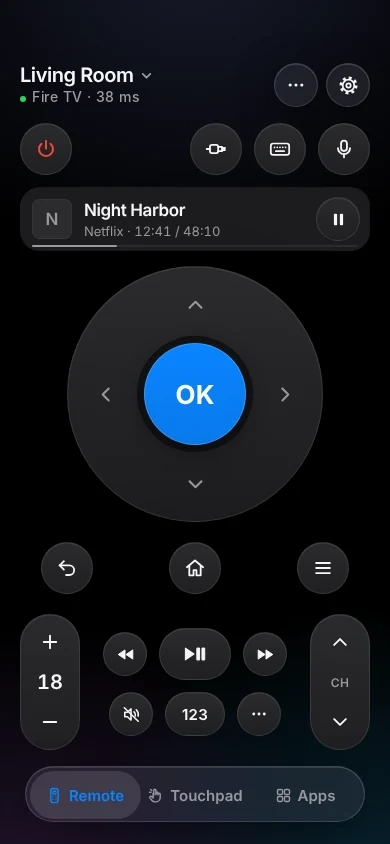
An iPhone remote for your Fire TV.
TVkip controls Fire TV sticks, Fire TV Cubes and Fire TV smart TVs running Fire OS over your Wi-Fi: every button, typing, apps and sleep or wake. It needs ADB debugging turned on once, in the Fire TV's developer options; the newest Vega OS sticks can't be controlled.
TVkip is an independent app. It isn't made by, affiliated with or endorsed by Amazon; the Fire TV name only describes which devices it works with.
What works on each Fire TV
Fire TV sticks, Cubes and smart TVs from Amazon, Insignia, Toshiba, Hisense, TCL, Panasonic, Xiaomi and others run Fire OS, which TVkip supports. Three new sticks run Vega OS, which it doesn't.
| Sticks and Cube (Fire OS) | Fire TV smart TVs | Vega OS sticks | |
|---|---|---|---|
| Found automatically | Yes | Yes | By IP address |
| Pairing | One setting, allow once | One setting, allow once | Not supported |
| Every button | Yes | Yes | No |
| Typing | Latin letters, no accents | Latin letters, no accents | No |
| Volume | Over HDMI-CEC; no level | Yes | No |
| Apps list and launch | Yes, without icons | Yes, without icons | No |
| HDMI inputs | No | No | No |
| Turn off / on | Sleep and wake | Off; on needs a setting | No |
| Now playing | Yes | Yes | No |
The one setting you may need
Fire TV lets phones control it only after ADB debugging is on. It takes a minute, once:
- Open Settings > My Fire TV > About (older models: Device or System) and select the device name seven times, until “You are now a developer” appears. Older models already show Developer Options.
- Go back to Settings > My Fire TV > Developer Options and turn on ADB debugging. You don't need “Apps from Unknown Sources”.
Some Fire TV smart TVs allow this only after you sign in to your Amazon account on the TV.
To turn a Fire TV smart TV on from your iPhone
Sticks and Cubes stay on Wi-Fi while asleep, so nothing to change. Fire TV smart TVs can drop off Wi-Fi when off: turn on their option to keep listening, for example Voice Commands When TV Screen is Off.
Set it up
- Turn on ADB debugging (above) and put your iPhone on the same Wi-Fi as the Fire TV.
- Press Home on the Fire TV remote, so it isn't asleep or showing the screensaver.
- Open TVkip and pick your Fire TV.
- The TV asks “Allow USB debugging?”. Tick Always allow from this computer and choose OK.
Without the tick, the Fire TV asks every time. Fire TVs from 2023 on may ask again after a week without using the app; choose OK again. The full guide is Connecting a Fire TV.
Honest limits
- Vega OS sticks can't be controlled: the Fire TV Stick 4K Select (2025), Fire TV Stick 4K (3rd gen) and Fire TV Stick HD (2026). Vega OS has no ADB debugging. Use the remote that came with the stick or Amazon's Fire TV app.
- Typing works for letters, numbers and punctuation; accented letters lose their accent (é becomes e), and other alphabets and emoji can't be typed.
- Sticks and Cubes don't report the volume. The volume keys go to your TV over HDMI-CEC; if they don't change the TV's volume, turn on Settings > Display & Sounds > HDMI CEC Device Control.
- Turn off puts a stick to sleep; your TV may stay on.
- No HDMI input switching and no app icons in the app list.
- Quick presses are grouped, because older Fire TVs need up to a second per command.
What's free, and what Pro adds
Free, for up to two devices: the whole remote (buttons, touchpad, keyboard, app launcher), Easy Mode, your iPhone's volume buttons, Control Center and Action button controls, the Lock Screen volume widget, the Live Activity, the Apple Watch remote for the device you're using and basic Siri.
Pro adds a third device and more, the full Watch app, more widgets, scenes and Kids Mode. Casting to a Fire TV needs a DLNA player app on it. Pro Yearly is US$14.99 a year with a 14-day free trial; Pro Lifetime is US$29.99 once.
Questions
Is turning on ADB debugging safe?
It lets apps on your home network control the Fire TV after you allow them on screen. TVkip uses it only to send remote buttons, type and open apps. You can turn it off again any time.
Which Fire TV Stick do I have?
Open Settings > My Fire TV > About. If it says Fire TV Stick 4K Select, Fire TV Stick 4K (3rd gen) or Fire TV Stick HD (2026), it runs Vega OS, which TVkip can't control.
Why does the Fire TV keep asking “Allow USB debugging?”
Tick Always allow from this computer before choosing OK. Fire TVs from 2023 on may still ask again after a week without the app.
Lost the Fire TV remote?
Once ADB debugging is on and allowed, TVkip does everything the remote does over Wi-Fi. To turn ADB debugging on in the first place, you need the remote once, or a replacement.