TVkip with your Roku.
TVkip works with Roku streaming players and Roku TVs as one of the nine TV platforms it supports: buttons, typing, apps, inputs on Roku TVs, and power. There's no pairing code, but newer Roku software needs one setting changed, in Roku's own menu, before phone apps may press buttons.
TVkip is an independent app, not made by, affiliated with or endorsed by Roku. Roku and Roku TV are trademarks of Roku, Inc.; the names only describe which devices it works with.
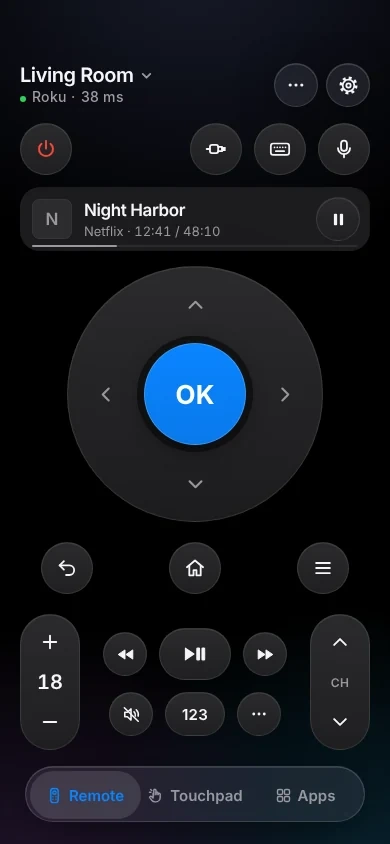
What works on Roku players and Roku TVs
Roku TVs are made by TCL, Hisense, Sharp, Philips, onn and others, and by Roku itself. Players are the Express, Streaming Stick and Ultra.
| Roku TV | Roku players and Streambar | |
|---|---|---|
| Found automatically | Yes | Yes |
| Pairing | No code; one setting | No code; one setting |
| Every button | Yes | Yes |
| Typing | Yes | Yes |
| Volume | Up, down, mute; no level | Over HDMI-CEC; no level |
| Apps list and launch | Yes | Yes |
| HDMI inputs | Yes | — |
| Turn off / on | Off; on needs Fast TV start | Off over HDMI-CEC |
| Now playing | App and media | App and media |
The one setting you may need
Since Roku OS 14.1, many Rokus start with Control by mobile apps set to Limited. Phone apps can then see the Roku but every button is refused. To let TVkip in:
- On your Roku, press Home and open Settings > System > Advanced system settings.
- Choose Control by mobile apps > Network access.
- Select Enabled (called Default on older Roku software).
Don't choose Permissive: Roku says it lets devices outside your home network send commands too, and TVkip doesn't need it. This is Roku's own setting, and Roku explains it in its help article How to install the Roku remote app. A Roku software update can switch it back to Limited; the same steps fix it.
To turn a Roku TV on from your iPhone
Turn on Settings > System > Power > Fast TV start. Without it, a Roku TV in standby stops answering.
Set it up
- Put your iPhone on the same Wi-Fi as the Roku.
- Open TVkip and allow Local Network access when iOS asks. Your Roku appears in the list.
- Pick it. There's no code to type.
- If the app says your Roku blocked the remote, change Network access to Enabled (above) and tap Try Again.
The full guide is Connecting a Roku.
Honest limits
- Limited mode stays Limited. TVkip never works around Roku's setting; if it's on Limited or Disabled, the app tells you and shows where to change it.
- No volume level. Roku's protocol for apps doesn't report the volume, so you get up, down and mute without a number.
- Players change volume through your TV over HDMI-CEC (Settings > System > Control other devices (CEC)), and only if your TV supports it.
- Players never fully turn off. Their power button turns the TV off only when the player controls it over HDMI-CEC.
- Private listening (headphones through the phone) isn't supported.
What's free, and what Pro adds
Every Roku remote button is free, for up to two TVs or players, along with typing, the app launcher, Easy Mode, Control Center and Action button controls, the Lock Screen volume widget, the Live Activity, the Apple Watch remote for the device you're using, basic Siri and 10 casts a day.
Pro adds a third device and more, screen mirroring, unlimited casting, the full Watch app, more widgets, scenes and Kids Mode. Pro Yearly is US$14.99 a year with a 14-day free trial; Pro Lifetime is US$29.99 once.
Questions
Why does the app say my Roku blocked the remote?
Your Roku's Network access for mobile apps is set to Limited or Disabled. Set it to Enabled in Settings > System > Advanced system settings > Control by mobile apps.
Should I choose Permissive?
No. Enabled is all TVkip needs. Roku says Permissive also accepts commands from outside your home network.
Can I see the volume level on my Roku?
No. Roku doesn't share the level with apps, so TVkip shows volume up, down and mute only.
Does it need a Roku account?
No. TVkip talks to your Roku on your home Wi-Fi, without signing in.